
This article is a reference to the pages under Settings → Service Configuration: what each one holds, the fields of its New dialog, and how the pages relate to each other. It does not cover pricing templates or chargeable weight in depth; those have their own articles, linked below.
Before you start
- Open the Settings gear at the top right. Service Configuration is in the Configuration column. It lists Pricing Templates, Service Types, Freight Types, Logical Freight ST, Logical Addresses ST, Pickup Services, Delivery Services, Freight Unit Types, Incoterms and Chargeable Volume and Weight.
- Each list has Refresh and Column Picker. Most have a New … button whose dialog offers Save Changes and Apply Changes. Pricing Templates and Incoterms have no New button.
- Existing records on most of these pages open read-only: the fields are shown but disabled, with no Update or Delete button. Chargeable Volume and Weight is the exception; its records have Update, Apply Changes and Delete. System records cannot be edited by anyone in your company, administrators included; an administrator can add records of your own where the page has a New button. If a system record needs to change, ask your Freightools contact.
- Fields marked with an asterisk are required.
How the pages fit together
The pages refer to each other:
- A freight type (Air, Ocean, Rail, River, Road) names the address types a leg starts at, passes through and ends at.
- A service type belongs to a freight type and names its logical addresses and its logical freight.
- Logical addresses are the routing stages, such as ORIGIN, POL, TRN, POD and DESTINATION. Logical freights are the legs between two logical addresses, such as Delivery Containers from POD - Port of Discharge to DESTINATION.
- Pickup services and delivery services name the logical address and logical freight at the origin and at the destination.
The same settings appear on a quotation's Basic Information tab as (S1) Service Type, (S3) Service Pickup and (S4) Service Delivery, next to (S2) Service Trade. Their codes are the S1, S3 and S4 parameters your number ranges can use: a quotation number such as "SP number-year - O-I - FCL/FCL" carries the service type code O (Ocean), the trade code I (Import) and the pickup and delivery service codes FCL. See How to Manage Number Ranges in Freightools.
Service Types
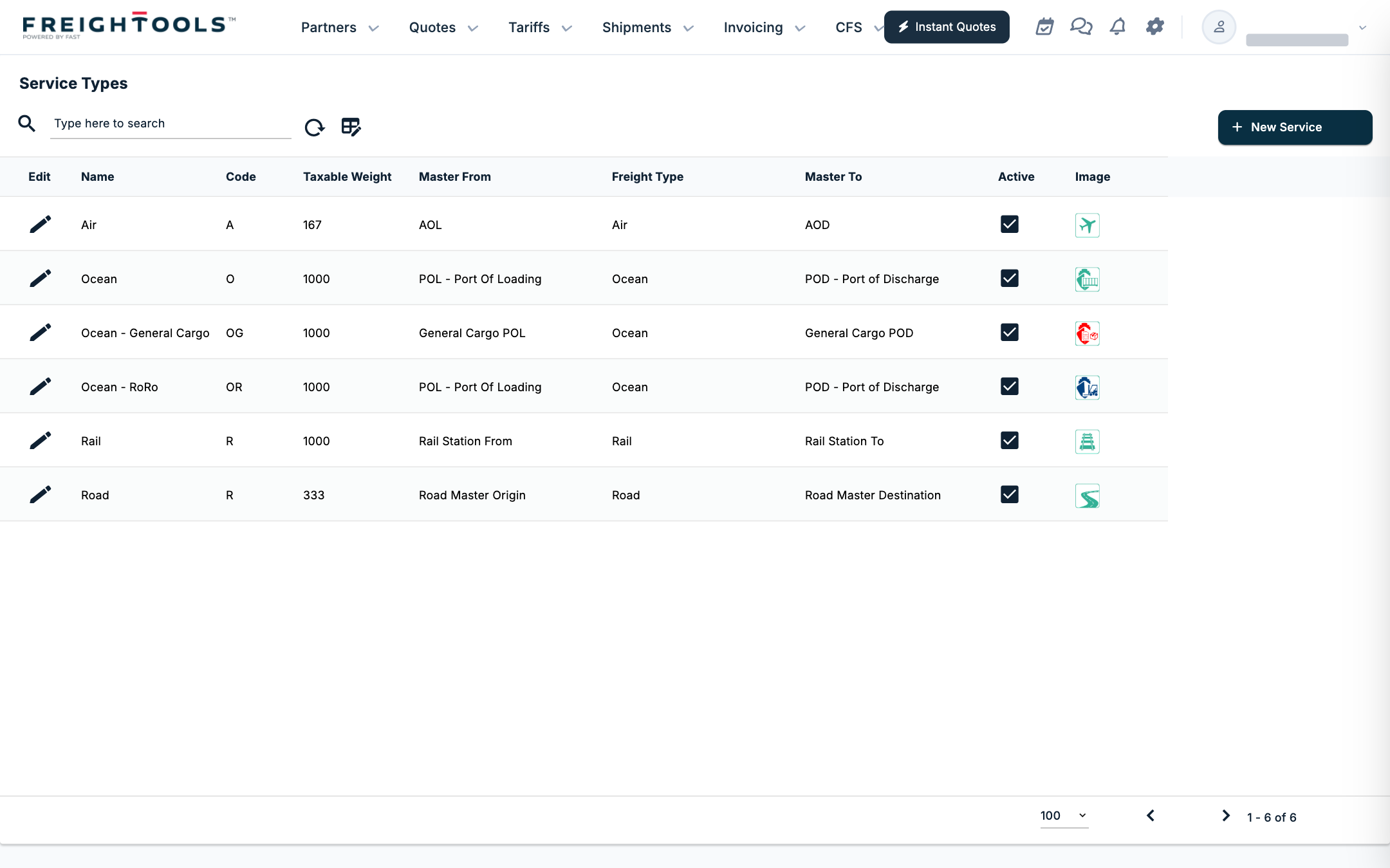
Columns: Name, Code, Taxable Weight, Master From, Freight Type, Master To, Active, Image. The list holds Air, Ocean, Ocean - General Cargo, Ocean - RoRo, Rail and Road. Master From and Master To are the main leg's ends, for example "POL - Port Of Loading" to "POD - Port of Discharge" for Ocean, or AOL to AOD for Air. Taxable Weight is a kilograms-per-cubic-metre ratio.
New Service Type has three groups:
- Basic Details: Name (required), Active, Freight Type, Code, Range Id, Taxable Weight.
- Service Labels: Equipment Type, Freight Mission, Equipment Number, Freight Document, Equipment Insurance, Freight Document Code, Freight Transit Point, Image, SVG.
- Address Types: Logical Addrees From (spelled this way on screen), Logical Address Between, Logical Address To, Logical Freight, Description.
Freight Types
Columns: Name, Address Type From Name, Address Type Between Name, Address Type To Name, Active, Image. For example, Ocean runs Sea Port to Sea Port, Air runs Air Port to Air Port, and Road runs Factory, Warehouse, Factory. New Freight Type asks for Name (required), with Active, Description, Address Type From, Address Type Between, Address Type To, SVG and Image.
Logical Freight ST
The page title is "Logical Freights ST". Columns: Name, (Logical Address) From, (Logical Address) To, KG/m3 TAX, Master. Examples: Air Freight from AOL to AOD, Delivery FTL from Road Master Destination to DESTINATION.
New Logical Freights ST asks for Name, (Logical Address) From, (Logical Address) To and Freight Type (required), and offers Active, Business Unit, KG/m3 TAX, Description and the check boxes Relevant Master, Is Buying, Master, Is Selling, Is Service Pickup, Is Service Delivery and Is Master Service Type.
Logical Addresses ST
The page title is "Logical Addresses ST". Columns: Name, Country, Customer, Master, Multiple, Hub Between. Examples: AOL, AOD, DESTINATION, CFS (Container Hub From and To), General Cargo POL and POD.
New Logical Addresses ST asks for Name, Logical Rooting Position and Address Type (required), and offers Active, Business Unit, Country, Customer, Description and the check boxes Master, Hub Between and Multiple.
Pickup Services and Delivery Services
Each list has Code, Name and Active. The codes are AOH, AOL (pickup) or AOD (delivery), FCL, FTL, GEN, INT, LCL, LCL-INT, LTL, OOG, RAIL and RoRo.
- New Pickup Service asks for Code, Name, Origin Logical Address and Origin Logical Freight (required), with Active, Exist Hub, Exist Terminal and Description.
- New Delivery Service asks for Code, Name, Destination Logical Address and Destination Logical Freight (required), with the same optional fields.
A service with Exist Hub ticked also shows Hub Logical Address and Hub Logical Freight.
Freight Unit Types
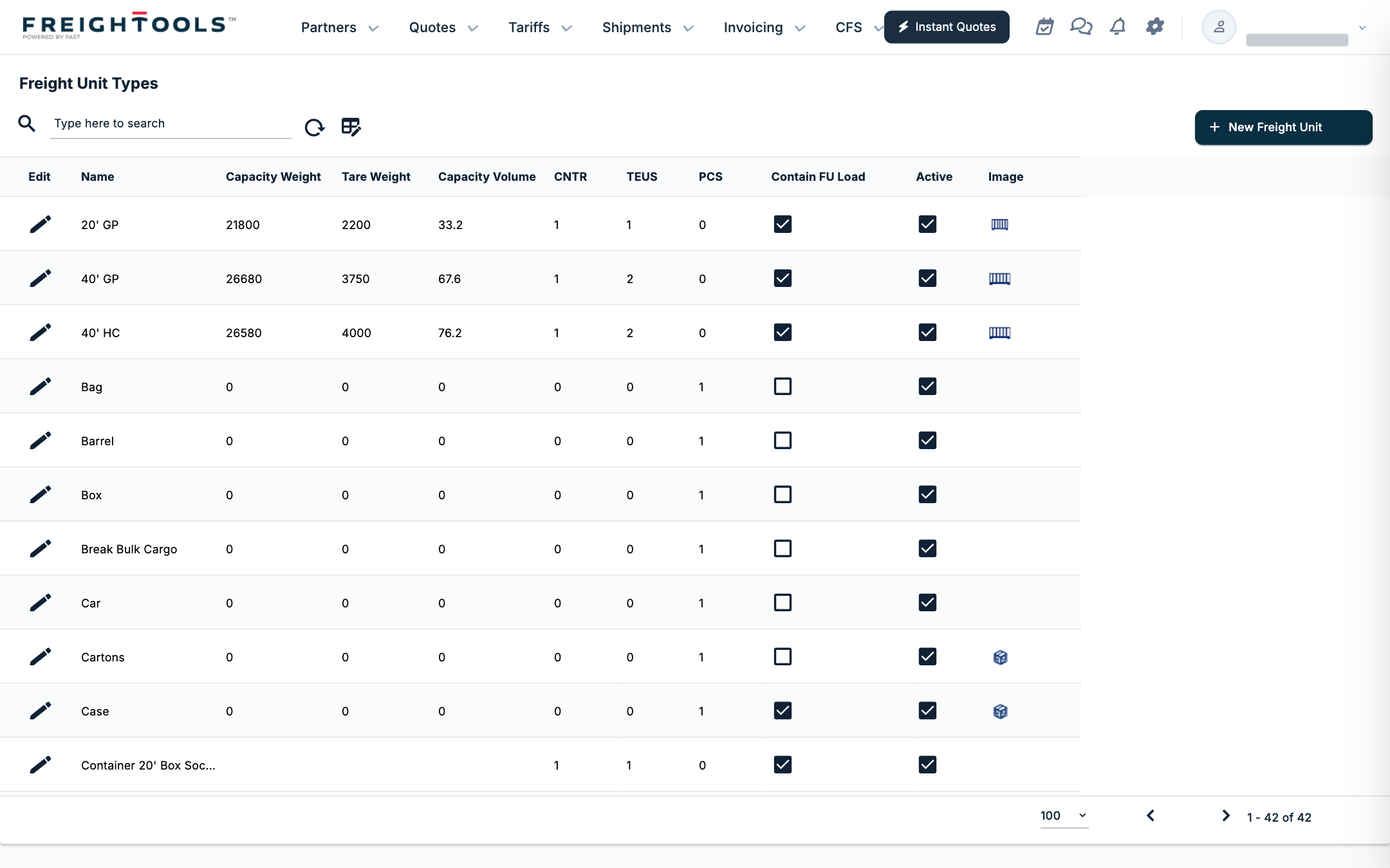
The containers and packages, such as 20' GP, 40' HC, Pallet or Cartons. Columns: Name, Capacity Weight, Tare Weight, Capacity Volume, CNTR, TEUS, PCS, Contain FU Load, Active, Image. A 20' GP counts as 1 CNTR and 1 TEUS; a 40' GP or 40' HC counts 2 TEUS; packages such as Bag, Box or Cartons count 1 PCS.
New Freight Unit Type asks for Name, CNTR, TEUS and PCS (required), and offers Active, Contain FU Load, Tare Weight, Dimensions Length, Dimensions Width, Dimensions Height, Capacity Weight, Capacity Volume, Description, Image and Default Packing Type.
Incoterms
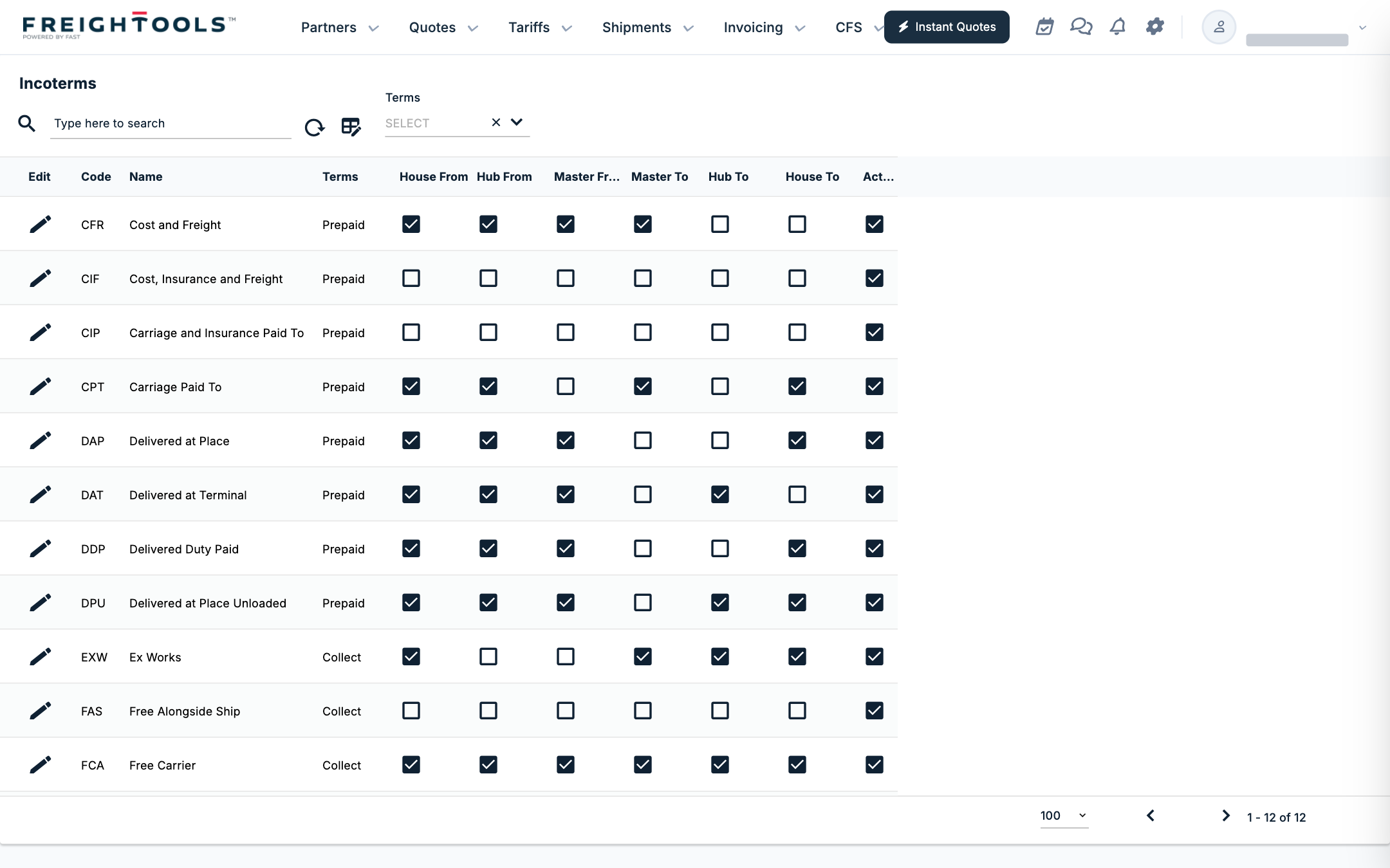
The twelve incoterms: CFR, CIF, CIP, CPT, DAP, DAT, DDP, DPU, EXW, FAS, FCA and FOB. The list has no New button and a Terms quick filter. Columns: Code, Name, Terms, House From, Hub From, Master From, Master To, Hub To, House To, Active.
An incoterm record holds Code, Name and Terms (Prepaid or Collect, required), Destination On, a Description that explains the term, and six check boxes — House From, Hub From, Master From, Master To, Hub To and House To — that say which legs of the shipment the incoterm includes in your company's set-up. The records are read-only; if a leg is set wrongly for your business, ask your Freightools administrator.
Pricing Templates and Chargeable Volume and Weight
- Pricing Templates lists one template per service mix: Air Service, General Cargo, Intermodal FCL, Ocean FCL, Ocean LCL, Project Cargo, Rail - General Cargo, Road FTL/FTL, Road LTL/LTL and Roll On Roll Of. See How to Configure a Service Mix.
- Chargeable Volume and Weight sets the kilograms that count as one cubic metre, per Service Mix, Service Trade and Freight Unit Type, in Cbm Equivalent Weight. See How to Configure Chargeable Volume & Weight.
If something goes wrong
| You see | What to do |
|---|---|
| A record opens with every field greyed out and no Update button | The record is system data; nobody in your company can edit it. Ask your Freightools contact if it is wrong. |
| Incoterms or Pricing Templates has no New button | These lists have no New button. |
| A new record will not save | Fill in every field marked with an asterisk. |