
A supplier is any company you buy from: a carrier, an agent at the other end, a customs broker,
a terminal. The record you create here is what buying agreements and RFQs point at.
Create the supplier
- Open Partners and select Suppliers.
- Click + New Suppliers at the top right of the grid.
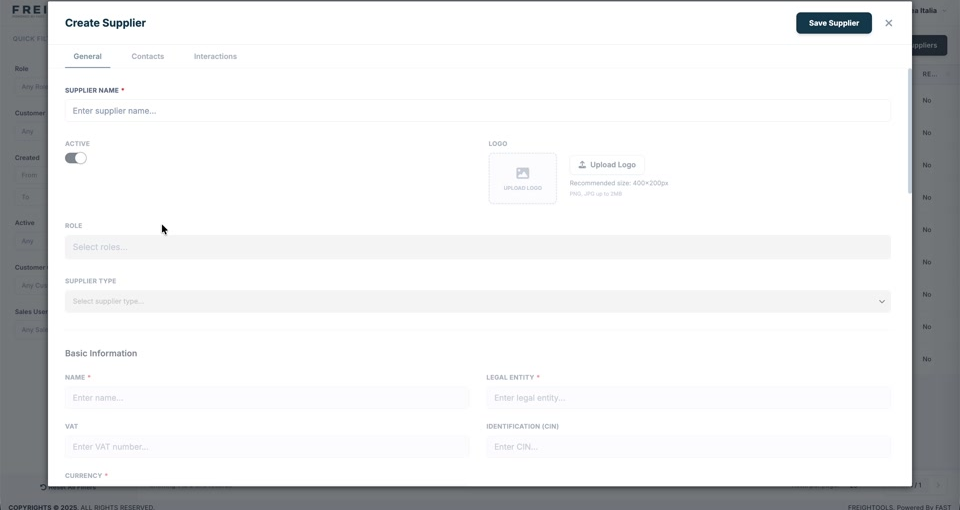
- Enter the Supplier Name and leave Active on.
- Upload a Logo if you have one — 400 × 200 px, PNG or JPG up to 2 MB.
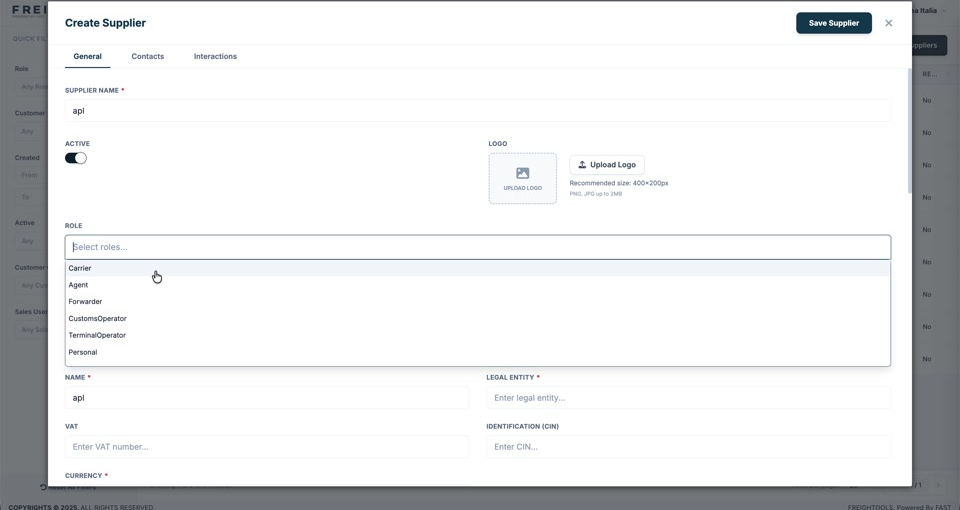
- Open Role and select every role this supplier plays for you. You can pick more than one.
| Role | The supplier is |
|---|---|
| Carrier | the company that actually moves the cargo. |
| Agent | your partner at the other end of the route. |
| Forwarder | another forwarder you buy from. |
| CustomsOperator | a customs broker. |
| TerminalOperator | a terminal or depot. |
| Personal | a personal contact record. | - Set the Supplier Type.
- Fill in Basic Information — Name, Legal Entity and Currency are required; add
VAT and Identification (CIN) when you have them. - Click Save Supplier.
Important: The role you choose changes the form. Selecting Carrier adds a
Carrier Information section for the carrier type, the system carrier and the demurrage free
days — see
How to relate a supplier to a System Carrier.
The other two tabs
Contacts and Interactions sit beside General, the same as on a customer. The
Contacts tab is covered in
How to see the contacts on a supplier.